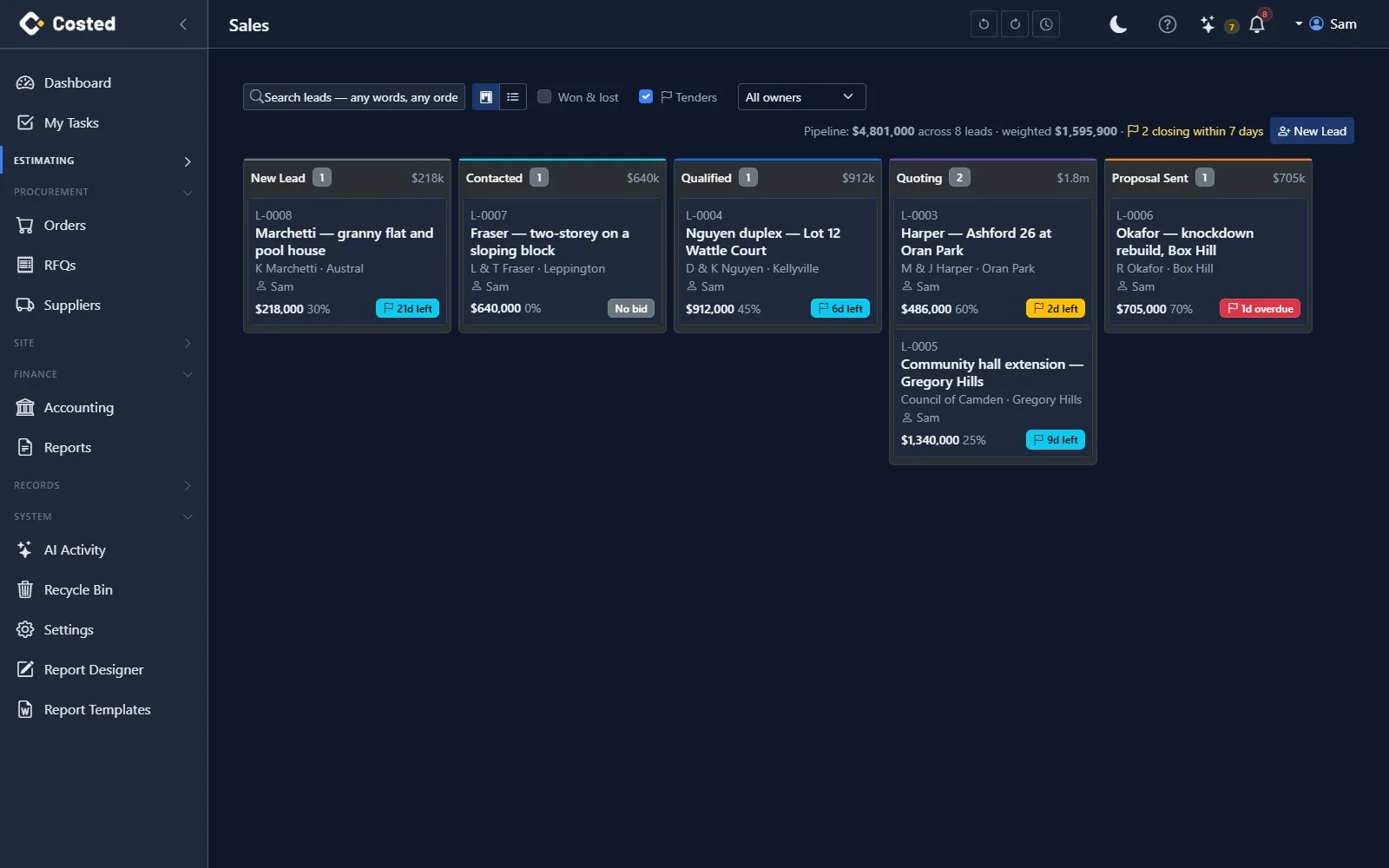
Leads move across a pipeline board from first call to a signed job. Put a closing date on one and it joins the tender register: bid or no bid, probability and weighted value, who is pricing it, the tender documents, reminders before the deadline, and a Win / Loss report that tells you where the work actually comes from.
New → Contacted → Qualified → Quoting → Proposal sent → Won or Lost. Drag a card to move it; every call, email, meeting, note and follow-up task is on the lead's timeline, with an owner and an open-task badge that goes red when you are late.
A closing date and time puts a lead on the register. The card shows the days left, the list sorts soonest first, the Tenders filter shows nothing else. Invited, public or negotiated; and an estimator who prices it while the owner runs the relationship.
Make the go / no-go call on the lead — No bid asks why and is logged. Give it a probability and the pipeline shows a weighted total (value × probability) next to the gross one, so a board full of long shots reads as what it is.
Drop the tender package, addenda and drawings on the lead; they are ordinary documents that follow it. The owner and estimator are reminded three days out, on the day, and the day after if the lead is still open — one notice each, none for a no bid.
Price the quote from a template job or line by line, send it on a secure link, and the client signs it there — or through DocuSign. Accepted becomes Won; Won becomes a job with its BOQ loaded, in one transaction.
Won and lost for any period, grouped by source, owner, month, tender type or suburb: win rate, values, average days to close and the most common lost reason — next to what is still open in each group. Export it, or ask Costed.
Nothing you do not have already. The register lives on the lead, so the phone call, the site visit, the price and the decision stay in one place.
Date and time. Drives the countdown badge, the sort order, the Tenders filter and the reminders.
Undecided until someone decides. No bid keeps the reason and stops the reminders; the decision is on the timeline with who made it.
0 to 100. Weighted value = estimated value × probability, shown on the lead, the board total and both reports.
Who is pricing it, distinct from the owner. Both are reminded, both appear on the register.
The tender package, addenda, drawings, your priced submission. Filed against the lead and visible in Documents.
Open, Due this week, Overdue, No bid, Won or Lost — computed on the Tender Register report with the days left, so the Monday meeting needs one screen.
Winning a lead creates the job from the lead's details, marks the lead Won and links the two. A won proposal carries its priced lines into the job's bill, so the estimate the client signed is the estimate you build to.
14-day free trial. No credit card. Your data, your call.